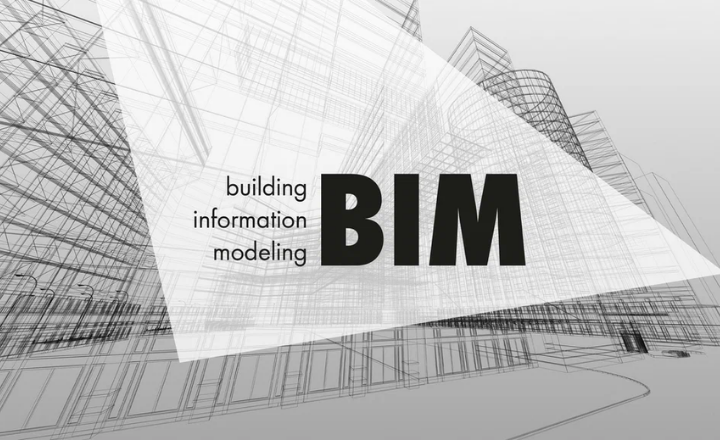
Building Information Modeling (BIM) in civil engineering is a digital process that creates intelligent, data‑rich 3D models of infrastructure projects such as roads, bridges, drainage systems, and urban developments so that all stakeholders can design, analyze, coordinate, and manage work from a shared virtual environment.
Common tools include Autodesk Civil 3D, Revit, InfraWorks, Navisworks, and various GIS and analysis platforms that link geometry with quantities, materials, schedules, and performance data.
The main benefits are better collaboration across disciplines, earlier clash detection, more accurate cost and time estimates, easier design changes, and improved lifecycle management of assets, which collectively reduce errors, rework, and project delays.

At the same time, BIM adoption faces challenges such as high initial software and training costs, resistance to changing traditional workflows, data‑management complexity, and the need for clear standards and interoperability between different tools and organizations.
Introduction to Building Information Modeling (BIM)
Building Information Modeling (BIM) represents a major shift in how civil engineering projects are planned, designed, constructed, and managed. Rather than relying on disconnected 2D drawings, BIM offers a data-rich digital environment where geometry, materials, schedules, and costs are integrated into a single intelligent model.
In today’s construction industry, BIM is not just a design tool it is a collaborative process that supports informed decision-making throughout the entire lifecycle of a project, from concept design to operation and maintenance.
Understanding BIM and Its Importance
At its core, BIM is a methodology that enables engineers, architects, contractors, and project owners to work on a shared digital representation of a built asset. Every element within a BIM model carries information, not just shape. This information may include dimensions, material properties, quantities, performance data, and maintenance requirements.
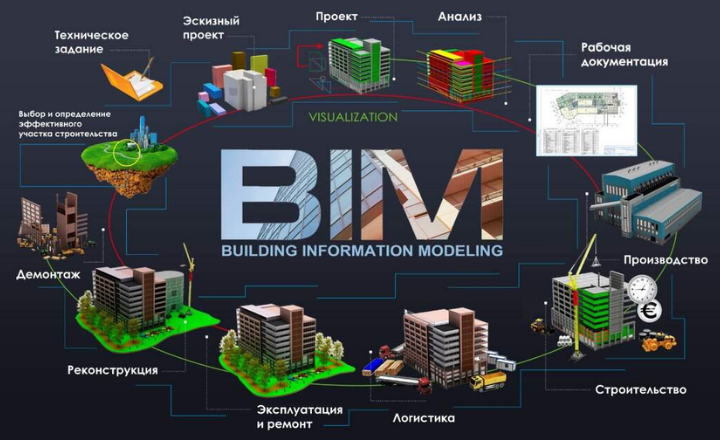
A comprehensive BIM model typically contains:
- Structural components such as columns, beams, slabs, and foundations
- MEP systems, including HVAC, electrical layouts, and plumbing networks
- Construction sequencing and phasing information
- Cost data and quantity take-offs
- Asset and facility management information for post-construction use
By centralizing all project data, BIM significantly reduces misunderstandings, design conflicts, and late-stage changes, resulting in better quality and more predictable project outcomes.
Why BIM Matters for Civil Engineers
For civil engineers, BIM has become an essential skill rather than an optional advantage. Its ability to provide real-time insights into design, cost, and constructability makes it invaluable for modern infrastructure development.
Key benefits of BIM for civil engineers include:
- Improved collaboration: All stakeholders work from coordinated models, reducing information silos
- Early clash detection: Design conflicts are identified before construction begins
- Accurate cost and time forecasting: Integrated data improves budgeting and scheduling accuracy
- Enhanced sustainability: BIM supports energy analysis, material optimization, and low-carbon design
These advantages allow engineers to deliver safer, more efficient, and more sustainable projects.
BIM vs Traditional CAD: What’s the Difference?
Traditional CAD tools focus primarily on drawing geometry, whether in 2D or 3D. While useful for drafting, CAD systems lack intelligence and data connectivity. BIM, on the other hand, creates smart models that respond dynamically to changes.
Unlike CAD, BIM provides:
- A centralized and consistent project database
- Parametric modeling, where changes automatically update all views
- Lifecycle-based insights, extending beyond design into construction and operation
This shift from drawings to data-driven models is what makes BIM a transformative technology for the construction industry.
Levels and Dimensions of BIM
Building Information Modeling (BIM) is categorized into various levels and dimensions, each representing a different degree of digital integration in construction projects. Understanding these levels helps in assessing the efficiency and collaboration involved in a project.
BIM Maturity Levels
BIM adoption is commonly described using maturity levels, which reflect the degree of collaboration and data integration within a project:
- BIM Level 0: Basic use of 2D CAD with no collaboration
- BIM Level 1: A combination of 2D and 3D models with limited data sharing
- BIM Level 2: Fully coordinated 3D models with collaborative workflows and shared data environments
- BIM Level 3: Advanced, cloud-based collaboration with real-time data integration across all disciplines
Many governments now require BIM Level 2 as a minimum standard for public-sector projects due to its proven efficiency and transparency.
BIM Dimensions and Their Role
BIM dimensions refer to the different layers of information added to a 3D model to support design, construction, and facility management decisions across a project’s lifecycle. Each “dimension” (3D, 4D, 5D, 6D, 7D, etc.) extends the model with a new type of data while still relying on the 3D geometry as the base.
Common BIM dimensions
- 3D BIM – Geometry and space
A digital 3D model of the building (architecture, structure, MEP) used for visualization, coordination, and early clash detection. - 4D BIM – Time and scheduling
3D + time: links model elements to the construction schedule (e.g., Gantt chart) to simulate sequences, phasing, and progress. - 5D BIM – Cost and quantity
3D + cost: attaches quantities and unit rates to elements so you can estimate budgets, track cost changes, and manage cash flow. - 6D BIM – Sustainability and performance
Adds energy, environmental, and lifecycle‑performance data (e.g., energy‑use analysis, carbon footprint, lifecycle‑cost studies). - 7D BIM – Facility and asset management
Focuses on operation and maintenance: equipment data, warranties, maintenance schedules, and asset histories for facility managers.
Role in a project
- 3D–5D mainly support design and construction (better coordination, fewer clashes, realistic schedules, and cost control).
- 6D–7D shift toward sustainability and long‑term operations, helping owners reduce energy use, plan maintenance, and manage assets efficiently.
BIM extends beyond geometry by incorporating additional dimensions that enhance project planning and management:
- 3D BIM: Visual representation of the building or infrastructure
- 4D BIM: Integration of time and construction sequencing
- 5D BIM: Cost estimation and financial control
- 6D BIM: Sustainability and energy performance analysis
- 7D BIM: Facility and asset management after project completion
Together, these dimensions enable a holistic approach to project delivery, covering the entire asset lifecycle.
Impact of BIM Levels and Dimensions on Construction
As projects advance in BIM maturity, they experience:
- Reduced risks through early issue identification
- Faster project delivery with optimized scheduling
- Stronger collaboration through cloud-based platforms
- Long-term value through sustainable and maintainable designs
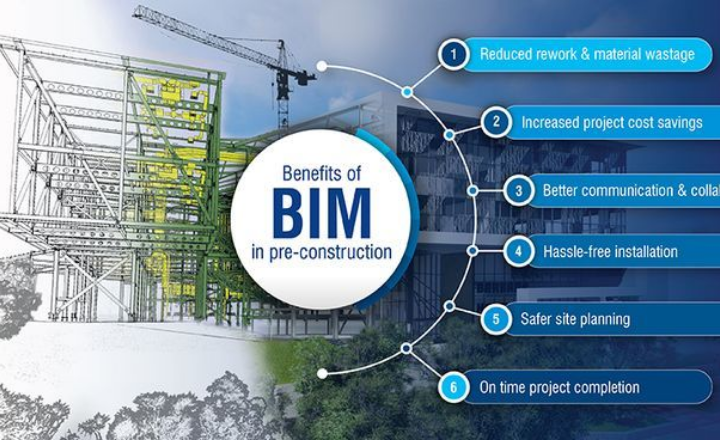
BIM has become a foundation for smarter and more resilient construction practices worldwide.
Leading BIM Software Tools
Leading BIM software tools include Autodesk Revit, widely used for building‑focused architectural, structural, and MEP modeling with strong documentation and coordination features.
For infrastructure and civil projects, Autodesk Civil 3D and InfraWorks are dominant, enabling site, road, and utility modeling integrated with survey and GIS data. Structural‑specific BIM is often handled by Tekla Structures and Bentley OpenBuildings Designer, while tools like Navisworks and Solibri support model coordination, clash detection, and model checking across disciplines.
Cloud‑based platforms such as Autodesk Construction Cloud (ACC) and BIMcollab provide collaboration, issue tracking, and federated‑model management, and open‑BIM tools like Graphisoft Archicad and Allplan offer alternative modeling environments with strong IFC support.
1. Autodesk Revit
Autodesk Revit is one of the most widely adopted BIM platforms, supporting architectural, structural, and MEP modeling within a single environment. Its parametric design engine ensures model consistency and accuracy.
Key features include multi-discipline coordination, automated documentation, and seamless cloud collaboration.
2. Archicad
Archicad, developed by Graphisoft, is known for its intuitive design workflow and strong Open BIM support. It is particularly popular among architects working on complex building forms.
3. Tekla Structures
Tekla Structures specializes in high-detail structural modeling, especially for steel and reinforced concrete projects. It connects design directly with fabrication and construction processes.
4. Bentley AECOsim (OpenBuildings Designer)
Bentley AECOsim Building Designer is the former name of OpenBuildings Designer, a multidisciplinary Building Information Modeling (BIM) application for architecture, engineering, and construction projects.
What it is
OpenBuildings Designer (formerly AECOsim) is Bentley’s integrated BIM platform that combines architectural, structural, mechanical, and electrical design in one environment. It evolved from older Bentley products (Bentley Architecture, Structural Modeler, etc.) and was rebranded as OpenBuildings Designer around 2019.
Key capabilities
- Multi‑discipline modeling: Create coordinated 3D models for architecture, structure, and MEP (mechanical, electrical, plumbing) in a single file.
- 2D from 3D: Generate construction drawings, sections, elevations, and schedules directly from the 3D model while maintaining company or project standards.
- Clash detection and coordination: Built‑in tools help identify spatial conflicts between disciplines before construction.
- Energy and daylight analysis: Includes energy‑simulation features and daylight‑aware analysis to support sustainable design.
- Open BIM and interoperability: Supports formats like IFC, DWG, and DGN, and integrates with other Bentley tools (e.g., ProjectWise, Navigator, LumenRT) and third‑party software.
Typical use cases
- Large or complex buildings such as commercial towers, hospitals, campuses, and mixed‑use developments.
- Projects that combine vertical buildings with horizontal infrastructure (roads, railways, utilities), where OpenBuildings Designer links to Bentley’s civil and infrastructure tools.
5. Navisworks
Navisworks is primarily used for model coordination, clash detection, and construction simulation. It plays a key role in 4D planning and project review.
Navisworks is a project review and coordination software from Autodesk, used mainly in architecture, engineering, and construction (AEC) to aggregate 3D models and analyze design, clashes, and construction sequences.
What Navisworks does
Navisworks is not a design tool like Revit or AutoCAD; instead, it combines models from different disciplines (architecture, structure, MEP, civil) into one coordinated environment for review, clash detection, and simulation. It supports many formats such as RVT, DWG, IFC, NWD, and point‑cloud data, making it ideal for multidisciplinary BIM coordination.
Main capabilities
- Model aggregation and review: Open and combine multiple 3D models, navigate in real time, add comments, markups, viewpoints, and measurements.
- Clash detection (Navisworks Manage): Find and report spatial conflicts between systems (e.g., duct vs. beam) and export clash reports for coordination meetings.
- 4D and 5D simulation: Link model elements to schedules (e.g., Microsoft Project or Primavera) to visualize construction sequences over time and, in some workflows, associate cost data.
- Quantification and takeoff: Perform 2D and 3D quantity takeoffs from models and PDF sheets to support estimating and planning.
- Rendering and publishing: Create photorealistic renders and publish lightweight NWD/DWF files for sharing with teams or clients.
Typical use cases
- BIM coordination for large buildings, infrastructure, or industrial projects where many disciplines work in parallel.
- Construction planning to validate sequences, detect clashes before site work, and communicate the build plan visually to stakeholders.
How BIM Improves Efficiency and Sustainability
Building Information Modeling (BIM) improves efficiency by giving all project teams a shared, data‑rich 3D model that supports better coordination, early clash detection, and more accurate scheduling and cost estimation, which reduces rework, delays, and disputes.
In terms of sustainability, BIM enables energy‑performance simulations, optimized material quantities, and waste‑reducing workflows, helping designers choose low‑impact materials, minimize overordering, and design buildings that use less energy over their lifetime.
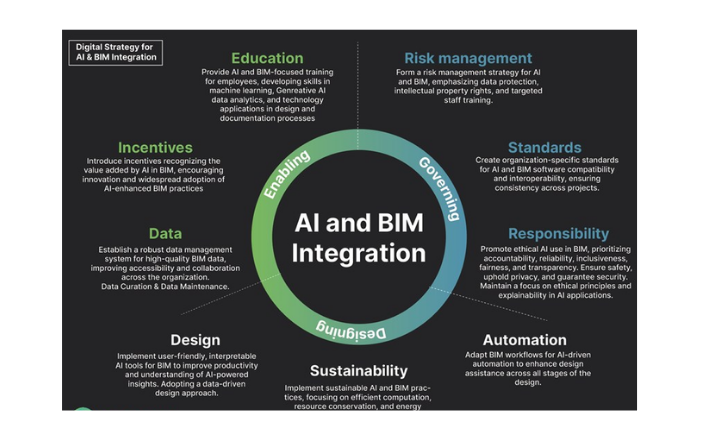
By integrating design, construction, and facility‑management data in one environment, BIM also supports longer‑term operational efficiency and lower maintenance costs, making projects both faster to deliver and more environmentally responsible.
1. Enhancing Project Efficiency
BIM addresses common construction challenges such as delays, cost overruns, and coordination issues by enabling:
- Centralized model-based collaboration
- Automated clash detection
- Digital construction sequencing using 4D BIM
- Real-time quantity take-offs and cost updates
These capabilities lead to smoother workflows, fewer errors, and better control over project delivery.
2. Supporting Sustainable Construction
Sustainability is increasingly critical in modern construction, and BIM supports this goal by allowing:
- Energy and performance simulations at the design stage
- Reduction of material waste through accurate modeling
- Selection of environmentally responsible materials
- Lifecycle analysis to minimize long-term operational costs
By embedding sustainability into early design decisions, BIM helps create buildings that are both efficient and environmentally responsible.
3. Real-World Applications of BIM
Many landmark projects have successfully applied BIM to achieve efficiency and sustainability goals. Smart office buildings, large transportation hubs, and complex mixed-use developments all demonstrate BIM’s ability to deliver measurable value.
These projects show how digital planning can reduce waste, optimize energy use, and improve construction outcomes.
Challenges in BIM Adoption and Practical Solutions
Despite its advantages, BIM implementation comes with challenges:
- High initial investment: Software, hardware, and training costs
- Resistance to change: Preference for traditional workflows
- Interoperability issues: Compatibility between different platforms
- Skills gap: Shortage of trained BIM professionals
- Legal uncertainties: Ownership and responsibility of BIM data
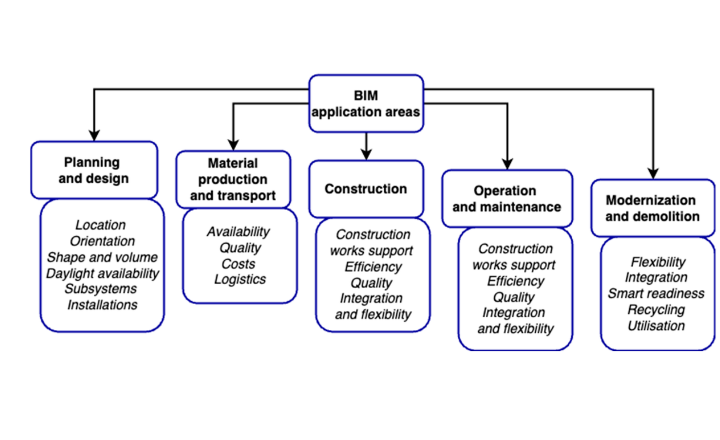
Practical solutions include phased implementation, targeted training programs, use of open standards like IFC, and clear BIM execution plans.
Conclusion
Building Information Modeling has transformed civil engineering by shifting the industry from drawing-based practices to intelligent, data-driven workflows. While challenges such as cost and skill development remain, the long-term benefits of BIM far outweigh these barriers.
As digital technologies continue to advance, BIM will play an even greater role in delivering efficient, sustainable, and high-quality infrastructure. For civil engineers in 2026 and beyond, embracing BIM is not just a competitive advantage; it is a professional necessity.